Until recently, mobile app publishers had no real control over the ads running inside their own applications. They could choose their networks, optimize their waterfalls, and monitor their eCPMs, but what actually appeared on users’ screens was largely out of their hands. Bad ads meant filing tickets, waiting on networks, and absorbing the damage in the meantime.
That’s changed. Publishers can now enforce ad quality in real time, at the impression level, before a bad creative ever reaches a user. And the impact goes well beyond blocking the occasional rogue ad. Ad quality has a direct effect on engagement, LTV, and ARPU. Publishers who get this right see it in their retention curves, their store ratings, and their revenue.
What Is an Ad Quality SDK?
An ad quality SDK is a publisher-side, in-app solution that gives publishers real-time visibility and control over every ad served in their application. The distinction from standard mediation tools matters: mediation determines which ads get served; an ad quality SDK monitors and enforces the standards those ads must meet once they’re inside your app.
A publisher-side solution covers three core areas:
- Real-time blocking intercepts problematic creatives at the impression level before they reach a user, regardless of which network served them. This spans the full spectrum of threats: UX violations, malvertising, and harmful ad content.
- Customized publisher control goes beyond blocking, giving teams the ability to define exactly what runs in their application, set thresholds per ad format, build allow and block lists, and adapt rules as their audience and monetization strategy evolves. The goal is serving relevant ads that align with your app’s goals and user experience standards.
- Actionable analytics provide full visibility into every ad served, benchmarking network performance, identifying top offenders, and flagging compliance gaps, giving monetization teams the data to hold partners accountable and continuously optimize revenue potential.
The practical outcomes of getting this right are measurable across the business. Eliminating unsuitable creatives protects inventory quality and supports stronger CPMs, fill rates, and long-term yield. Real-time protection reduces user churn and complaints, preserving the audience trust that ad revenue depends on. And by surfacing which demand partners are consistently delivering poor quality, publishers can enforce standards and optimize their partner mix rather than absorbing the cost of underperformance. The operational side benefits too: automating ad quality management reduces the overhead of manual monitoring, freeing teams to focus on strategy rather than firefighting.
The reason publishers are investing in this level of control comes down to one thing: the cost of not having it.
Why Ad Quality Matters: The Real Cost of Bad Ads
Most publishers discover ad quality problems reactively. A complaint rolls in, they file a ticket with the network. By the time it’s resolved, the damage is already done.
According to AppHarbr’s 2026 In-App Network Ad Quality Index, 84% of users uninstall applications due to negative ad experiences, not poor content, not bugs. Ads. And 61% go further, actively warning others away from apps with poor ad quality. The revenue implications compound quickly: uninstalls suppress organic growth, store rating drops reduce visibility, and ARPU erodes as session quality deteriorates.
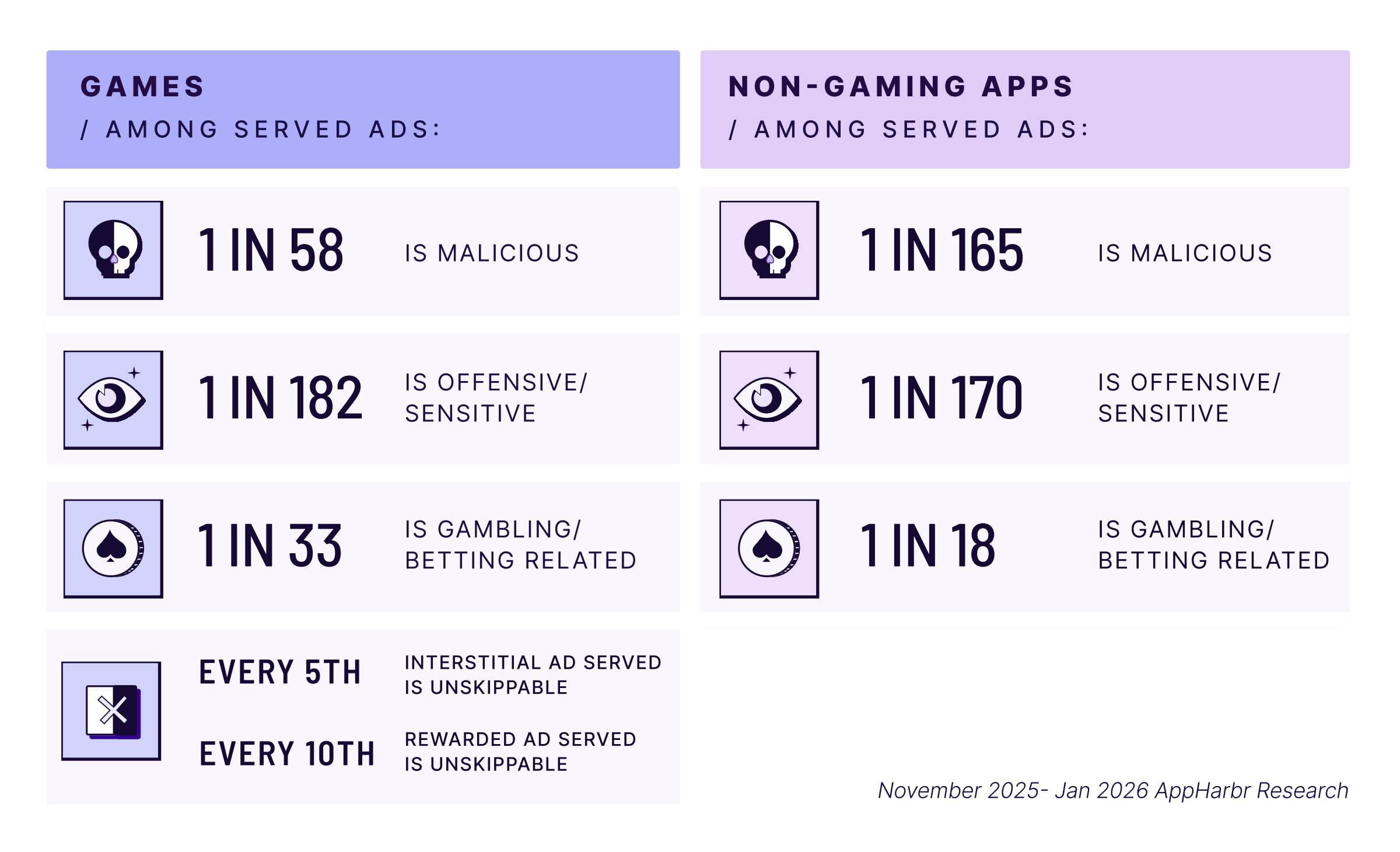
The problem is systemic. Bad ads often go undetected for days, running up impressions and review damage simultaneously. Apps that exceed Google Play’s ANR and crash rate thresholds face reduced store visibility, compounding the revenue damage long after the bad creative has been removed. And for any ad-monetized application, whether a mobile game, utility, news app, or social platform, where every impression carries measurable value, that’s not a technical inconvenience. It’s an operational risk.
To understand the full scope of what publishers are up against, it helps to look at what bad ads actually look like in practice.
What Bad Ads Actually Look Like: The Full Threat Landscape
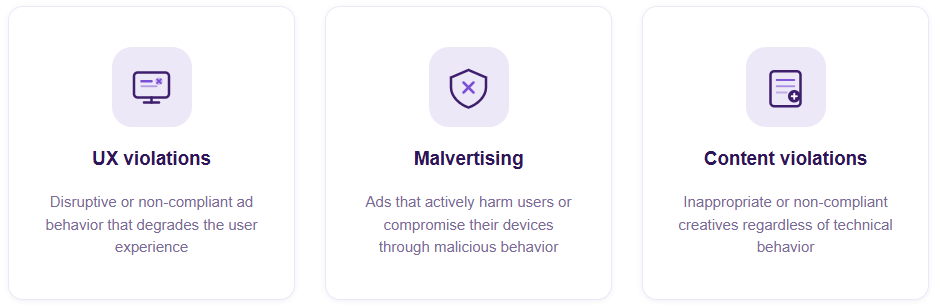
Ad quality issues fall into three categories. Understanding the full scope is what separates publishers who react to problems from those who prevent them.
- UX and technical violations are ads that degrade the user experience through disruptive or non-compliant behavior. This includes extended ad duration, unskippable interstitials with fake close buttons, auto-playing audio and video, pop-ups, heavy ads that slow or crash the application on a user’s device, and frozen screens caused by failed ad loading. Each of these directly impacts session length, retention, and store ratings.
- Ad security and malvertising covers ads that actively harm users or compromise their devices. Auto-redirects, button hijacks, brand impersonation, fake antivirus alerts, financial scams, and deceptive landing pages all fall into this category, ranging from disruptive to outright dangerous for users and publishers alike. According to the TAG 2025 Impact and Compliance Report, malvertising threat intelligence sharing increased by 82% year over year, reflecting how rapidly this threat landscape is evolving.
- Ad content violations are creatives whose content is inappropriate or non-compliant regardless of technical behavior. Sexually explicit content, graphic violence, hate speech, misleading UI, false claims, unlabeled gambling ads, and region-restricted promotions all carry real consequences, from app store violations and platform bans to regulatory exposure.
Choosing the Right Ad Quality SDK
Knowing the full range of threats is only half the equation. The other half is making sure your solution is actually built to address all of them.
- The starting point is protection breadth. A capable ad quality SDK should detect and act on the complete range of ad quality issues, from malware and scams to disruptive UX violations, with the ability to block, filter, or flag problematic ads before they reach users.
- Customization is equally important. Publishers have different audiences, different monetization strategies, and different tolerance thresholds. The right solution lets you define your own policies, run A/B tests, and build enforcement rules that ensure ads served always align with your app’s goals and audience expectations, rather than locking you into a fixed set of options. Granular blocking controls should cover keywords blocklists, pre-defined content categories, app store categories, domains and brands blocklists, individual ad and advertiser blocking, app ID blocklists and allowlists, and the ability to manage multiple policies simultaneously. On the content side, look for the ability to catch miscategorized creatives, stop unsuitable, sensitive, and regulated content before delivery, enforce custom policy standards, and access 50+ content categories for precise classification.
- Transparency is what makes all of that actionable. Full visibility into every programmatic ad served, with the ability to store and share data securely with partners, is what allows monetization teams to make informed decisions rather than reactive ones.
- Coverage should be non-negotiable. Ad quality enforcement needs to apply consistently across all in-app ad formats and all geographies, whether your application runs on Android SDK environments, iOS, or Unity. Gaps in coverage are gaps in protection.
- Finally, the solution should be publisher-facing and demand-agnostic. A platform integrated on the publisher side, with no commercial ties to ad networks or demand partners, is one where enforcement decisions are made entirely in the publisher’s interest.
Once you’ve identified the right solution, the next step is getting it live.
Integration: What to Expect
AppHarbr uses an SDK-based integration with support for iOS, Android, and Unity. The SDK is lightweight by design, introduces no additional network calls, and is built to run alongside other SDKs without conflicts. Publishers configure ad quality policies through a dashboard and set enforcement rules without needing to rework their existing ad waterfall or bidding setup.
The integration requires dedicated developer time and includes a configuration testing phase before going live. It can be staged and tested in a controlled environment first, and full documentation is provided throughout. The timeline largely depends on developer availability.
Once live, policy and rule changes can be made at any time without pushing a new app update. AppHarbr is compatible with all major mediation platforms and supports 45+ ad networks, including smaller and custom setups.
The Bottom Line
Ad quality is a frontline revenue issue. Publishers treating it that way, with real-time enforcement, customized control, and full transparency, see it in their ARPU, their store ratings, and their users’ trust.
The publishers that aren’t are losing ground quietly, one bad creative at a time.
Explore AppHarbr’s full ad quality capabilities to see how it works in practice, or take the next step.
Want to see what AppHarbr caught in apps like yours last quarter? Request a free ad quality audit →