Most mediation platforms give you an ad review center. You can browse creatives, see what ran, and search for a specific ad across every network they mediate. For most ad quality workflows, that’s where the process ends: you can find the ad, and you can report it by email to the network. What happens next is up to them.
AdWatch is AppHarbr’s ad gallery, built around a different premise. Finding the ad is the starting point, not the finish line. Once you’ve located a creative, you can understand its full scope and act on it immediately, without waiting on a network to respond.
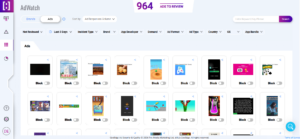
Find Any Ad, Fast
When a user reports a problematic ad, the details are rarely complete. You might have a screenshot, a keyword from the creative, an advertiser name, or just a report that something appeared in a specific placement. AdWatch gives you the tools to track it down quickly: search by advertiser or brand, filter by demand source, ad format, or ad unit ID, or use free-text search to locate creatives containing a reported phrase, including text that appears within the creative itself.
Every creative in the gallery carries full context: the creative itself and its destination, which demand source served it, where it appeared, what format it ran as, and when it was seen. That metadata is what makes the filters useful. You’re not just finding an ad. You’re finding the exact creative that was shown to users, along with the context needed to understand how it got there.
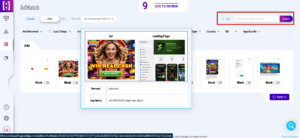
See the Bigger Picture
Finding the creative in question is only the first step. In many cases, the ad that triggered a complaint is just one of several versions of the same creative running across your inventory.
AdWatch’s similarity grouping automatically clusters related creative variants together. Instead of encountering the same ad in multiple variations scattered across the gallery, AdWatch presents them as a single group. More importantly, when it’s time to act, you block the entire group in one click rather than tracking down and handling each variant individually.
You can also switch to the Brands view, which groups creatives by advertiser rather than showing them individually. If a specific brand is consistently serving low-quality or policy-violating ads, that pattern surfaces quickly and the entire brand can be blocked with a single button.
Once you’ve identified the source of a problem, whether it’s a single creative, a group of related variants, or an advertiser, you’re ready to take action.
When You Find Something, Act on It
Most mediation platform galleries stop at visibility. You can find the ad and report it by email to the network. What happens next is out of your hands.
AdWatch continues into enforcement. Once you’ve identified the issue, you can respond at the level that makes sense. A single problematic creative can be blocked immediately. If the issue spans multiple variants, blocking the similarity group takes care of all of them in one click. For broader patterns, blocking at the brand level prevents future creatives from the same advertiser from appearing.
When blocking isn’t the right first move, the Share button packages the full ad details, including the creative, landing page, click URL, and serving context, into a publicly viewable link, ready to send to the demand partner. Unlike mediation platforms, where sharing a violation means waiting for the network to act, AppHarbr lets you block the ad immediately and notify the partner on your own terms.
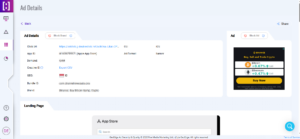
AdWatch is the investigation layer. AppHarbr is the enforcement layer.
AdWatch helps you find problematic ads, understand their scope, and take action. Every creative you review, share, or block feeds into AppHarbr’s broader ad quality protection, helping stop bad ads before they reach users.
AppHarbr operates at the pre-impression level, intercepting bad ads before they’re served. When one is stopped, a replacement is automatically served in its place, preserving fill rate without compromising the user experience.
If you’re still managing ad quality manually, request a demo to see how AppHarbr helps publishers investigate, block, and prevent bad ads at scale.