Tech support scams ranked among AppHarbr’s top 10 malvertising threats in Q3 2026. During the quarter, AppHarbr blocked more than 200,000 tech support scam ads in mobile apps, the majority served to users in North America.
But the ad itself often gives little indication of the threat behind it. Across the campaigns AppHarbr Security has observed, the creative can be a package-tracking notice, a warning about an email account, or an ordinary product ad. The content of the ad is often unrelated to the scam that appears after the interaction, when the user reaches a page claiming there is a problem with their device, account, or a recent payment.
For mobile publishers, that disconnect creates a security challenge beyond the individual creative. An ad that looks acceptable inside the app can be only the entry point to a malicious post-click experience. Understanding the threat therefore means looking beyond what the creative shows to what happens next.
What Is a Tech Support Scam?
A tech support scam is fraud disguised as help. Scammers impersonate support staff from trusted companies and invent a problem involving the user’s device, account, or a recent payment. The supposed solution is to contact that fake support team, usually through a phone number displayed prominently on the page.
The support interaction separates this threat from fake antivirus ads, which push users to download or buy a supposed security product. A tech support scam uses scare tactics to steer the user toward a person posing as support, even if that person later convinces the victim to install software or grant access to the device.
How Tech Support Scam Ads Work in Mobile Apps
The creative usually bears no relation to the scam behind it. It can look like any other ad in the app, giving the user little reason to suspect what sits behind it. The warning, the phone number and the impersonated brand appear only after the tap, which is how a creative can look acceptable while its destination does the damage.
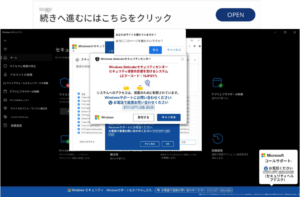
The scare starts on the landing page. The screen may fill with alerts, error codes, operating-system logos, and security terminology that make a webpage resemble a warning generated by the device itself. Other variants take a different route, claiming an account has been suspended, presenting an unfamiliar charge, or showing an invoice for an order the user never placed.
Some pages go further and change how the device behaves. AppHarbr Security has observed pages that make mobile devices vibrate, adding a physical signal that something is wrong. Instructions not to restart, fake dialogs that make leaving the page appear risky, error codes to quote to “support,” and phone numbers repeated across the page all direct the user toward the same next step: making the call.
Once the user calls, the scam moves beyond the ad. A person posing as support takes over the problem the page invented. According to the FBI, tech support scammers may demand payment by wire transfer, gift card, or cryptocurrency. They may also direct victims to download software that gives them remote access to the device, potentially exposing personal information and files or allowing the scammers to steal money from financial accounts.

The Risks of Tech Support Scam Ads for Users and Publishers
For users, the consequences can continue after the fraudulent page is closed. Software installed under the guise of technical support can remain on the device, while information or account access surrendered during the interaction can leave the victim exposed beyond the initial scam. What began with an ad can become a longer-term security or financial problem.
Publishers face a different problem: users do not necessarily separate an app from the advertising served inside it. The campaign may have entered through a third-party demand source, but the user encountered it as part of the app experience. A fraudulent warning or support journey can reflect back on the app where the interaction began, potentially leading users to leave the session, complain publicly, or express their frustration through an app store review or rating.
App stores don’t treat third-party advertising as somebody else’s problem either. Google Play considers ads and their associated offers part of the app. Its Deceptive Ads policy bars ads that impersonate “warning elements of an operating system,” and its Deceptive Behavior policy extends to third-party SDKs and ads. Apple makes developers responsible for the ad networks and third-party SDKs in their apps, and Guideline 2.5.18 prohibits interruptive ads that manipulate or trick users into tapping them. A tech support scam that enters through the ad stack is a user-safety problem and a potential compliance problem at the same time.
Blocking the Scam Before It Reaches the User
There is no single “tech support scam creative” to block. One can arrive as an ordinary banner, another as a simple prompt, while the landing page behind it invents a security problem, a suspended account, or a charge that never happened. What connects them is the journey: an ad served inside the app leads the user toward someone posing as support.
By the time the user has to decide whether a warning is fake, whether a charge is real, or whether a support number can be trusted, the scam has already reached them. The user should never become the final detection layer. Blocking these campaigns means looking beyond the creative itself and identifying the malicious experience before it reaches the user.
AppHarbr analyzes ad experiences and blocks identified tech support scam campaigns pre-impression, before they render in the app. This gives publishers a way to stop the malicious journey before users are left to recognize the scam themselves. Explore how AppHarbr detects and blocks malicious ad experiences before they reach users.